
Content chaos is the silent killer of great marketing teams. Missed deadlines, scattered files, and endless email threads can derail even the brightest campaigns. Now imagine swapping all that stress for seamless collaboration — and finally watching your team’s ideas turn into polished, published content on time, every time.
In this guide we break down the seven best editorial planning tools to transform your workflow: keeping you organized, boosting your team’s efficiency, and helping you deliver top-quality content consistently. For each tool you’ll get its current 2026 pricing, its core strength, and exactly who it’s built for — plus a decision guide and an FAQ at the end so you can choose without guessing.
Note: Prices were last checked in mid-2026 and are based on annual billing unless stated otherwise. These tools change their pricing often — always confirm on the tool’s official pricing page before you buy.
What is an editorial planning tool?
An editorial planning tool is software that holds your publishing pipeline in one place — ideas, briefs, owners, due dates, review stages, and a calendar of what ships when. It answers who is writing what, by when, and where each piece currently stands.
The category overlaps heavily with general project management software, and that overlap is the source of most bad purchases. A tool built for engineering sprints will technically hold a content calendar, but it won’t have the views editors actually work in. The distinction worth holding onto:
- Editorial planning tools organize the pipeline: briefs, drafts, statuses, owners, publish dates.
- Editorial calendar tools organize the schedule: what publishes when, and how it gets promoted.
- Content strategy tools decide what belongs on the calendar in the first place — a different job entirely, and the one most teams skip.
Most of the seven tools below sit in the first two categories. None of them sit in the third, which is a limitation worth understanding before you buy.
Why a modern editorial planning tool matters
The hidden cost of disorganized content operations
When organization slips, chaos follows. If you’re juggling spreadsheets, chasing email threads, and relying on scattered notes, tasks get forgotten and deadlines slip by unnoticed. The result? Even your best content ideas — lost among missed steps and duplicated effort — never reach their full potential.
CMI’s B2B content marketing has consistently found that only a minority of marketers work from a documented content strategy, a telling sign of how widespread the problem is. Disorganized workflows don’t just slow you down; they also make it hard to spot content gaps or keep up with rising publishing demands. The more blogs, social posts, and email campaigns your team manages, the higher the risk of confusion — putting both quality and consistency at stake.
How planning tools create clarity and structure
With the right tool, you gain a clear, centralized view of your entire workflow. Platforms like Trello, Asana, or Notion let you see what’s being worked on, who’s responsible, and when each task is due — all in one place. Visual elements like boards, color-coding, and customizable calendars help you track progress at a glance. Automated reminders and notifications keep everyone aligned and accountable. You’ll spot gaps in your schedule fast, make sure every piece gets the attention it deserves, and prevent last-minute scrambles.
Key features to look for in an editorial workflow tool
Not every tool does everything. Before you choose, weigh these four categories against your team’s needs.
1. Collaboration and task management. A good tool makes teamwork effortless and keeps everyone in sync. Visual boards, customizable cards, and clear task assignment mean every team member knows their responsibilities at a glance. This centralized approach cuts down scattered emails and endless spreadsheets, and keeps accountability transparent.
2. Customizable calendars and templates. When you can design your own editorial calendar, planning gets far less stressful. A single view of your schedule, paired with ready-made templates that fit your process — whether blogs, newsletters, or social campaigns — keeps the team organized and responsive.
3. Integration capabilities. Connecting your tool to the apps you already use eliminates repetitive work. Integrations with marketing and productivity tools (like Google Sheets, Slack, or Zapier) let your team automate handoffs and keep data in sync. Smooth automation means fewer errors and more time for creative work.
4. Progress visualization and reporting. Clear progress tracking brings confidence. Visual dashboards and Kanban boards show project status instantly; color-coded reports highlight which tasks are on schedule and where bottlenecks are forming. With strong reporting you can spot trends, close gaps, and keep projects moving.
Quick comparison of all 7 editorial planning tools
| Tool | Best for | Free plan | Paid entry point (annual) |
|---|---|---|---|
| Trello | Simple, Kanban-focused teams | ✅ (up to 10 boards per workspace) | Standard ~ $5/user/mo |
| Asana | Structured PM and larger teams | ✅ (up to 2 users) | Starter ~ $10.99/user/mo |
| CoSchedule | Content & social marketing teams | ✅ (free calendar) | Social Calendar ~ $19/user/mo |
| Airtable | Custom, database-driven workflows | ✅ (up to 5 editors) | Team ~ $20/seat/mo |
| Monday.com | Visual dashboards & deadline tracking | ✅ (up to 2 seats) | Basic ~ $9/seat/mo (3-seat min) |
| Notion | All-in-one: notes + wiki + database | ✅ (generous for solo use) | Plus ~ $10/user/mo |
| Adobe Workfront | Enterprise, high-volume operations | ❌ | Custom (contact sales) |
Figures come from each vendor’s public pricing page — Trello, Asana, Notion, Monday.com and Airtable — and change often.
1. Trello: visual boards for effortless content flow
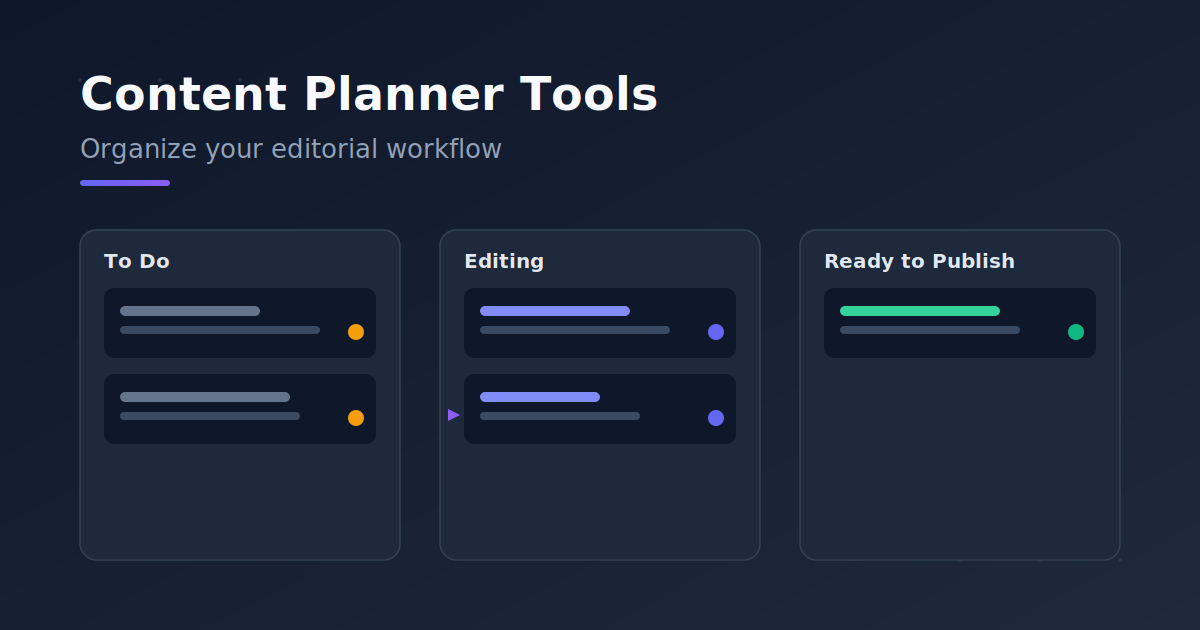
Organizing your content workflow becomes far more intuitive with Trello’s Kanban-style boards. Every idea, draft, and published piece gets its own card, which you drag across columns like “To Do,” “Editing,” or “Ready to Publish.” This visual approach lets you spot bottlenecks instantly and keeps the whole team updated on the status of every piece.
Trello is great for teamwork, too: assign cards to teammates, leave feedback with comments, and attach files or checklists so nothing slips through the cracks. Its clean interface makes onboarding new members easy, regardless of their technical skill.
Pricing (2026): A permanent Free plan capped at 10 boards per workspace. Standard is roughly $5/user/mo (annual), which removes the board cap and adds custom fields. Premium is roughly $10/user/mo, unlocking Timeline, Calendar, Table, Dashboard, and Map views. Enterprise starts around $17.50/user/mo (50-seat minimum).
Best for: Small to mid-sized teams that want a simple, cheap, quick-to-launch Kanban workflow.
Limitations: The Free plan allows only 250 automation runs per month, and you’ll need Premium for advanced reporting and the extra board views — including the calendar view, which is usually the first thing an editorial team asks for.
2. Asana: structured project management for editorial teams
Asana lets your team automate every stage of the editorial workflow: assign topics, set deadlines, and map the journey from initial idea through editing, approval, and publishing — all in one platform. Its intuitive editorial calendar keeps everyone aligned, and its automation features eliminate repetitive manual updates.
For high content volume or larger teams, Asana really shines: Timeline views, workload management, and detailed reporting give you full visibility into the editorial pipeline, and they scale as your team grows. If you’re weighing it against a more flexible workspace, this breakdown of whether Notion or Asana scales better for content teams walks through the trade-offs in detail.
Pricing (2026): The free Personal plan is now capped at 2 users for accounts created after 12 November 2025, though older accounts keep their previous allowance — which is why some guides still quote 10 or 15 free seats. Starter is roughly $10.99/user/mo (annual; $13.49 monthly), which removes the user cap and unlocks Timeline/Gantt views, unlimited custom fields, forms, and automations. Advanced is roughly $24.99/user/mo (annual), adding Goals, portfolios, workload, approvals, proofing, and time tracking. Enterprise is custom.
Best for: Growing teams and complex operations that need structure, reporting, and the ability to manage multiple campaigns at once.
Limitations: The free plan is now heavily limited, and you have to jump to Advanced — more than double Starter’s price — for portfolio management, approvals, and proofing.
3. CoSchedule: all-in-one marketing calendar for content marketers
CoSchedule brings your entire editorial workflow under one roof. Its marketing calendar lets you see every content project — blog post, social campaign, or newsletter — at a glance, plan months ahead, and drag and drop to reschedule. It’s smooth for assigning tasks and clarifying who owns what across a marketing team.
Pricing (2026): A free calendar to get started. Social Calendar is roughly $19/user/mo (annual) for social scheduling. Agency Calendar is roughly $59/user/mo for agencies that need a separate calendar per client. Content Calendar and the full Marketing Suite are custom-priced (contact sales).
Best for: Content- and social-focused marketing teams that want planning, creation, and publishing centralized in one calendar.
Limitations: The two separate product lines (Social Calendar vs. Marketing Suite) can be confusing, and there’s no built-in AI content generation.
4. Airtable: customizable databases for editorial organization
Airtable gives you the best of both worlds: it looks as friendly as a spreadsheet, but under the surface it handles data with the power of a database. Build custom tables for your content calendar and contributor list and link them together. Switch between Grid, Calendar, and Kanban views, add custom fields (status, due date, author), and use color-coded tags to highlight priorities.
Pricing (2026): The Free plan covers up to 5 editors and 1,000 records per base. Team is roughly $20/seat/mo (annual) with 50,000 records per base and Timeline/Gantt views. Business is roughly $45/seat/mo with advanced sync and permissions. Enterprise Scale is custom.
Best for: Teams with unique workflows who want to shape their workspace to match their exact process, and operations where one topic spawns many linked assets.
Limitations: Pricing is per-editor — anyone with edit access counts as a full seat (though read-only viewers and form submitters are free). The jump from Team to Business is steep.
5. Monday.com: visual dashboards to track every deadline
One glance at your Monday.com workspace tells you which articles are drafts, which are ready for review, and which are racing toward a deadline. Intuitive color-coding and built-in progress bars surface bottlenecks before they become obstacles. Its flexible boards adapt to any team’s workflow — from a solo creator to a large editorial department.
Pricing (2026): A Free plan for up to 2 seats. Basic is roughly $9/seat/mo, Standard roughly $12/seat/mo (the best value for most teams), and Pro roughly $19/seat/mo — all billed annually. Enterprise is custom.
Best for: Teams that want visual dashboards, strong automation, and varied project views with a polished interface.
Limitations: All paid plans require a 3-seat minimum — so even a solo user pays at least $36/month on Standard. Basic ships without automations or integrations, which makes Standard the real starting point. Automations also have monthly caps, and overages cost extra.
6. Notion: the all-in-one workspace for content teams
Notion keeps every note, guideline, and calendar you need in a single home. Instead of switching between apps, everything — project timelines and due dates, editorial standards, and task statuses — stays organized in one accessible hub. Its flexible structure lets you build custom databases for tracking articles and set up boards, templates, and collaborative docs that mirror your exact workflow.
Pricing (2026): A Free plan that’s generous for solo use, though a 1,000-block cap applies once a second member joins the workspace. Plus is roughly $10/user/mo (annual) with unlimited guests and 30-day history. Business is roughly $20/user/mo. Important change: since May 2025, the standalone Notion AI add-on is gone, and full AI access now requires the Business plan or higher. Unlike Monday.com, Notion has no seat minimum.
Best for: Teams that want a flexible workspace that’s simultaneously a wiki, a project database, a task manager, and a note-taking tool.
Limitations: It has no strong native scheduling or calendar layer, no formal approval state, and if you need AI features you’re pushed to Business.
7. Adobe Workfront: enterprise-grade workflow management
When high-stakes campaigns and a steady stream of deliverables are on the line, you need a system that brings clarity to every stage. Adobe Workfront gives you unmatched visibility and control over every moving part of the editorial workflow: role assignment, custom approval stages, and real-time progress monitoring — all centralized.
Its real strength is deep integration with Adobe’s creative suite (Photoshop, Illustrator, InDesign), so designers, writers, and project leads collaborate without toggling between apps, and assets move smoothly from draft to final approval.
Pricing (2026): Workfront has no public pricing and no free plan; it’s enterprise, custom-quoted through Adobe’s sales team.
Best for: Large organizations with high content volume, multiple brands, or a serious need to integrate with the Adobe ecosystem.
Limitations: It’s overkill — and overpriced — for small teams, and setup and onboarding take time.
Which editorial planning app works best on mobile?
Trello has the strongest mobile experience of these seven, because its board-and-card model translates almost perfectly to a small screen. Asana and Monday.com are close behind for checking status and updating tasks on the move, while Notion and Airtable are the weakest, since their real power lives in database views that a phone screen struggles to render.
This matters more than most buying guides admit. Editorial work involves a lot of small, time-sensitive actions — approving a draft, moving a card, answering a comment — that people do between meetings or away from a desk. A tool that forces every one of those back to a laptop quietly adds a day to your turnaround.
Three things worth testing on your own phone before you commit:
- Can a reviewer approve without a laptop? Try the full review action on mobile, not just reading the notification.
- Does the calendar view exist on mobile at all? Several tools drop or heavily simplify it.
- Are notifications useful or noise? A tool that sends everything to everyone gets muted within a week, which defeats the point.
Workflow planning vs. content strategy planning
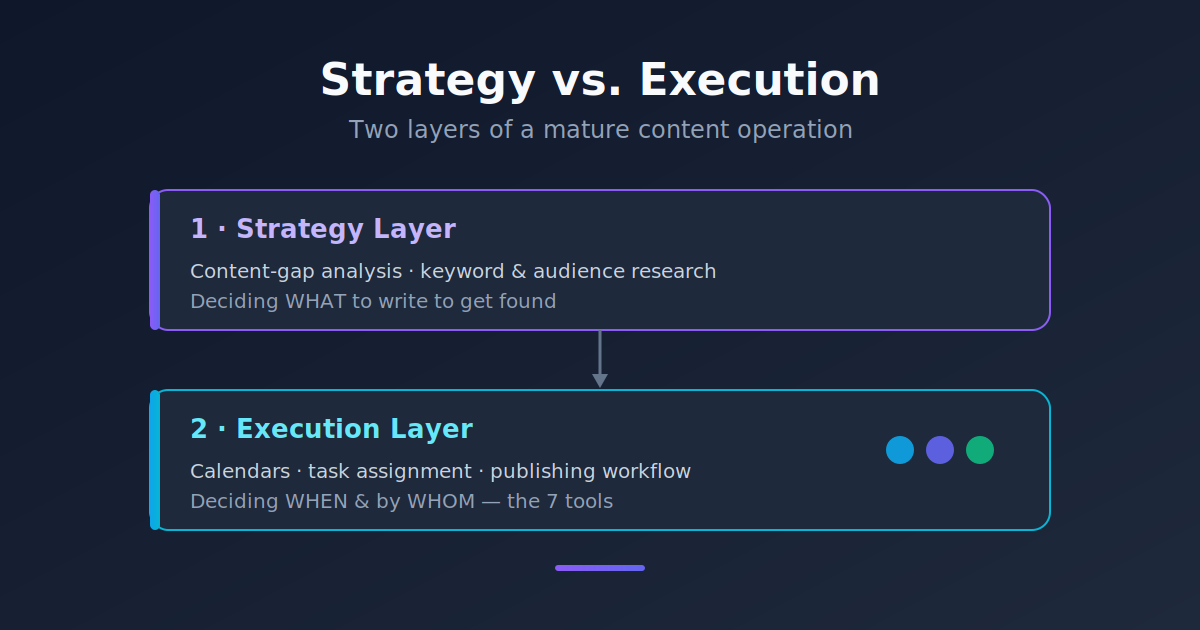
Here’s a distinction a lot of teams miss. All seven tools above excel at one thing: organizing people and tasks. They tell you who publishes what, and when. But none of them tell you what to write so your audience actually finds you.
Put differently, these tools answer “when, and by whom?” — not “which topic, and to what end?” A flawless editorial calendar still won’t drive traffic if it’s full of topics nobody is searching for.
That’s why mature content operations usually have two layers that complement each other rather than compete:
- The strategy layer: content-gap analysis, keyword and audience-question research, and deciding what to write so you get found on Google and in AI answer engines (like ChatGPT and Perplexity).
- The execution layer: exactly what these seven tools do — turning those decisions into a calendar, assigning tasks, and moving each piece from draft to publish.
Some teams handle the strategy layer manually each quarter with a spreadsheet and a keyword tool. Others use a dedicated platform. PlanMoon is one option in that second category: it finds the content gaps on your site, drafts and publishes the pieces that fill them, and tracks whether you’re being cited in Google and in AI answers like ChatGPT. Either way, settle the strategy first, then pour it into your chosen workflow tool — that way every task you create in Trello or Asana has a clear “why” behind it.
How to choose the right editorial planning tool for your team
Pick the simplest tool that matches your team size, publishing volume, and channel mix — then stop. Migrating from a simple tool to a more powerful one is always easier than fighting a tool that’s too heavy for your team.
1. Assess your current workflow. Are you running several channels at once, or focused on one platform? A handful of simple blogs, or complex campaigns with multiple contributors? For simple schedules, even a spreadsheet like Google Sheets works. For multi-task projects, Trello or Asana give you visual overview and status tracking. If communication and accountability are the pain points, Monday.com makes ownership of every task clear.
2. Match features to your content goals. Is your priority smooth scheduling, or deep analytics and campaign management? For marketing teams, CoSchedule centralizes creation and publishing. For maximum customization, Airtable offers unmatched flexibility. For an all-in-one workspace, Notion brings notes, databases, and wikis together.
3. Plan for growth. Spreadsheets work fine for small teams, but as content volume rises you’ll likely need something more advanced. Asana and Monday.com scale without sacrificing clarity; for multi-brand organizations, an enterprise tool like Adobe Workfront can manage even the busiest calendars. Notion and Airtable also adapt as your needs change.
If your team has grown past a simple list of tools and now needs the wider field compared on price, team size, and calendar features, our guide to the best content planning tools in 2026 covers eight platforms in depth. And if the specific thing breaking your workflow is sign-off rather than scheduling, our comparison of content planning software for team commenting and approvals is the better starting point.
Frequently asked questions
What is the best editorial planning tool? There’s no single best tool. Trello is the best editorial planning tool for small teams that want a simple Kanban workflow, Asana for structured teams that need approvals and reporting, Notion for teams that want briefs and calendar in one workspace, Airtable for database-driven content operations, and Adobe Workfront for enterprise scale. Match the tool to your team size and publishing volume rather than to the longest feature list.
What’s the best free editorial planning tool? For a no-cost start, Trello (up to 10 boards per workspace) and Notion (generous for solo use) are two strong options. If you have a small multi-person team, Notion’s free plan is usually more flexible; if you want a visual Kanban workflow, Trello gets going faster. Note that Asana and Monday now cap their free plans at 2 users.
Which editorial planning app works best on mobile? Trello, because its board-and-card model translates almost perfectly to a small screen. Asana and Monday.com are close behind for status checks and quick updates. Notion and Airtable are weakest on mobile, since their power lives in database views that phone screens struggle to render.
What’s the difference between an editorial planning tool and a project management tool? The line has blurred. Project management tools like Asana and Monday.com are more general-purpose but work well for editorial planning with custom calendars and boards. Tools like CoSchedule are purpose-built for content-marketing workflows. The configuration matters more than the category label.
Do I actually need a paid tool to manage content? Not necessarily. Small teams do fine with free plans or even a spreadsheet. Upgrading to a paid plan usually pays off once content volume, team size, or the need for automation and reporting grows.
Which editorial planning tool is cheapest for small teams? Trello Standard at around $5/user/month is the cheapest paid plan here. Notion at $10/user with no seat minimum is often more affordable in practice than Monday.com, which requires a 3-seat minimum — meaning a two-person team still pays for three.
Will these tools tell me what content to write? Mostly no. These seven tools focus on organizing and executing the workflow, not the strategy of which topics to write to get found on Google and in AI search. For that, you need a separate layer of content-gap analysis and keyword research that complements these tools.
Conclusion
The right editorial planning tool unlocks a new level of productivity and clarity for your workflow, helping you move from scattered ideas to a cohesive, actionable plan. By centralizing tasks, streamlining collaboration, and giving clear visibility into every stage, these platforms let you deliver high-quality content consistently — without the stress of missed deadlines.
So why not start today? Set up a simple Kanban board in Trello, or test a collaborative calendar in Asana. Even one small change can reveal how much smoother your planning and publishing can become. And remember: getting your editorial calendar organized is only half the job — the other half is making sure the content you plan is exactly what your audience is searching for.

Related Posts