
If you are comparing content planning tools, the wrong decision is usually not “Tool A versus Tool B.” It is choosing a calendar-first app when your real problem is approvals, or buying a complex project system when your team only needs a clean editorial calendar and a dependable publishing rhythm. The best fit depends on three things: team size, publishing volume, and how many channels you manage. That matters because, as CMI’s 2025 B2B content marketing research shows, 76% of B2B marketers have a dedicated content marketing team or person, and among those with dedicated resources, 54% work in teams of just 2–5 people.
That small-team reality changes the buying decision. Most teams do not need another disconnected spreadsheet, another chat thread, or another static content calendar. They need one content planning system that centralizes ideas, briefs, drafts, calendars, approvals, and publishing work; offers flexible views like calendar, board, list, and dashboard; and keeps strategy visible without turning every campaign into a project-management burden.
This guide is built to help you leave with a clear answer. Not the broad “these are all good options” answer. The specific “this is right for my team” answer.
What are the best content planning tools for content teams in 2026?
The best content planning tools in 2026 are Notion and Trello for small teams, Asana, Monday.com, and ClickUp for growing teams that need approvals, and Airtable or Monday.com for high-volume, multi-channel operations. CoSchedule is the strongest pick for calendar-led marketing teams, and HubSpot Content Hub is the natural choice for teams already running marketing on HubSpot. There is no single winner; the right tool depends on your team size, publishing volume, and channel mix.
For teams of one to five publishing a handful of pieces a week, Notion or Trello is usually enough. For teams of five to fifteen where approvals keep stalling, Asana, Monday.com, or ClickUp adds the ownership and permissions layer you are missing. For high-volume operations where one topic spawns six assets across channels, Airtable or Monday.com handles the campaign structure better. CoSchedule fits teams whose core problem is publishing cadence and promotion timing. And whichever you pick, remember that none of these tools decides what you should publish. That is a separate job, and it is the one most teams underestimate.
What is a content planning tool?
A content planning tool is software that holds your content pipeline in one place: ideas, briefs, owners, due dates, review stages, and a calendar of what ships when. It answers who is doing what, by when, and where it stands right now.
It is worth separating four categories that get lumped together, because buying from the wrong category is the most common and most expensive mistake here.
| Category | What it solves | Typical examples |
|---|---|---|
| Editorial calendar tools | Publishing cadence, campaign timing, promotion scheduling | CoSchedule, social schedulers |
| Project management platforms | Ownership, approvals, dependencies, cross-team visibility | Asana, Monday.com, ClickUp, Trello |
| Content operations databases | Structuring assets by campaign, format, channel, and pillar | Airtable, Notion databases |
| Marketing suites with content built in | Tying content to the CRM, campaigns, and attribution | HubSpot Content Hub |
| Content decision and visibility tools | Deciding what to write next and whether it gets found | SEO and GEO platforms, keyword and gap analysis tools |
Most teams shop only in the middle rows, then wonder why a well-run calendar still produces content nobody finds. If you are specifically a small business team, our guide to content calendar software covers that narrower case on its own.
What is the best editorial calendar software for content teams?
For most content teams, the best editorial calendar software is Notion or Trello at the small end and CoSchedule when publishing cadence and promotion timing are the core concern. If your calendar needs to sit inside a wider approval and reporting workflow, Asana, Monday.com, or ClickUp add the calendar view on top of stronger task management. The distinction that matters: a pure editorial calendar tool schedules what publishes and when, while a planning platform manages the briefing, drafting, and approval work behind each date.
Which content calendar tools are best for collaborative marketing teams?
For collaborative marketing teams where several people touch each asset, Monday.com and Asana lead because they combine a shared calendar with role permissions, comment threads, and approval steps in one place. ClickUp is the strongest free option for collaboration since it does not cap the number of members. Notion suits smaller collaborative teams that want briefs and the calendar in the same workspace. Trello works when the collaboration is simple and everyone just needs to see the same board.
What is the best content calendar software?
The best content calendar software is Notion or Trello for small teams, CoSchedule for teams whose main concern is publishing cadence, and Monday.com or ClickUp once the calendar has to carry approvals and reporting as well. There is no universal answer because a calendar is only the visible layer — what differs between these tools is the workflow underneath it.
If all you need is a shared view of what publishes and when, almost any of them will do and you should pick on price and ease of adoption. The choice only starts to matter when the calendar has to answer a second question, such as what is stuck, who owns it, or what performed.
Which tools are best for team commenting and approvals?
Every tool here supports comments; far fewer record who approved what, when, and on which version. ClickUp gives the most approval capability per dollar, Asana has the cleanest formal model but only on its Advanced tier, and Notion has excellent commenting with no approval state at all. If sign-off is the specific thing breaking your workflow, our guide to content planning software for team commenting and approvals compares all nine tools on that alone.
Does Asana work as a content calendar? (2026 features)
Yes. Asana works well as a content calendar, and its calendar view maps each task to its due date across list, board, and timeline layouts. The caveat for 2026 is that the calendar-adjacent features editorial teams rely on, including timeline (Gantt) view, custom fields, forms, and rules-based automation, sit behind the paid Starter tier; the free Personal plan is capped at two users and omits them. For a team already running approvals and ownership in Asana, adding a content calendar is straightforward. For a team that only needs a calendar, Asana is more platform than the job requires.
What is the best rated content calendar in the industry?
Monday.com and ClickUp are the highest rated content calendar tools in the industry, both sitting at roughly 4.7 stars on G2, with Asana close behind at about 4.4 from more than 13,000 reviews. Among calendar-first tools rather than general project platforms, CoSchedule rates highest.
That is the short answer, and it is worth knowing how little it should decide.
Which content planning software is highest rated for editorial calendar management and workflow automation?
For editorial calendar management combined with workflow automation specifically, Monday.com rates highest, followed by ClickUp and then Asana — because that pairing rewards tools that hold a calendar view and an automation engine in the same place. But “highest rated” is a weaker signal than it looks, and it is worth understanding why before you let it decide anything.
Three problems with reading ratings straight off the badge:
- The user mixes are not comparable. A 4.4 drawn from thousands of enterprise deployments and a 4.7 drawn from a lighter, smaller-team user base are not measuring the same experience. More reviews usually means more edge cases and a lower average.
- Ratings reward onboarding, not longevity. Most reviews are written in the first few months of use. The complaints that matter for content teams — automation limits, notification overload, reporting that breaks at scale — surface in year two.
- The category is wrong. These tools are rated as project management software, not as editorial calendars. A tool can rate brilliantly for engineering sprints and poorly for a content workflow.
The more useful way to read review sites: filter to your own company size, sort by most recent, and read the three-star reviews rather than the extremes. Those are where people describe what the tool actually does badly while still recommending it.
If you forced a ranking, best to worst
For the specific job of editorial calendar management combined with workflow automation, a defensible order is Monday.com, ClickUp, Asana, CoSchedule, HubSpot Content Hub, Airtable, Notion, then Trello. That order changes completely for other jobs, which is exactly why a single ranking is misleading — but here is the reasoning.
- Monday.com — the best balance of calendar view, automation, and dashboards for marketing specifically. Loses points for a three-seat minimum and automation runs metered per month.
- ClickUp — comparable capability and the most generous free tier, but the steepest configuration burden of the group.
- Asana — the cleanest workflow model and easiest adoption, held back by the features editorial teams want sitting on the Advanced tier.
- CoSchedule — purpose-built for calendar and promotion, so it wins on cadence and loses on custom workflows and reporting depth.
- HubSpot Content Hub — strong if your CRM, email, and content already live in HubSpot, because content connects to attribution natively. Hard to justify standalone on price.
- Airtable — the most powerful structure for campaign-based content, but the automation and record limits arrive early and non-technical contributors find it least intuitive.
- Notion — the best planning and briefing environment on the list, the weakest formal automation and approval layer.
- Trello — the easiest to adopt and the fastest to outgrow. Calendar and timeline views are not on the free plan.
Reorder the list by “which tool do writers actually enjoy using” and Notion moves to the top. Reorder it by “cheapest path for a two-person team” and ClickUp wins. The ranking is only meaningful once you have named the job.
How to compare the best tools for content strategy planning
To compare content strategy planning tools well, weigh them on six factors that create daily friction rather than on feature counts: planning depth, workflow control, team visibility, channel fit, complexity cost, and reporting value. The rest of this section defines each one. For a decision article to be useful, it has to compare tools on the things that create daily friction. Feature checklists alone do not do that. The evaluation here focuses on how well each tool supports an actual content marketing workflow from planning to publishing.
- Planning depth: Can the tool handle content pillars, campaigns, tagging, and editorial organization rather than just dates?
- Workflow control: Does it support task assignment, approvals, role permissions, status tracking, and ownership?
- Team visibility: Can strategists, writers, editors, designers, and stakeholders all see the same source of truth?
- Channel fit: Is it better for blog and SEO operations, social media scheduling, or mixed-channel planning?
- Complexity cost: Will the tool save time, or will the setup and maintenance become a second job?
- Reporting value: Can the team connect planned work to performance and spot what is actually working?
How do you evaluate content planning platforms and choose the right one for your team?
Evaluate content planning platforms in this order: name the bottleneck you need to remove, rule out the wrong category, shortlist two tools that fit your team size, then run one real campaign through each for two weeks. Feature lists should be the last thing you look at, not the first.
The reason this order works is that almost every regretted purchase comes from getting step one wrong. A team that says “we need better content planning” usually means one specific thing: we miss deadlines, or approvals stall, or nobody knows what is coming, or we cannot see what worked. Each of those points at a different tool. Skipping straight to a comparison table means you optimise for the tool with the most features rather than the one that removes your bottleneck.
If you want the fastest decision path, start with the table below, then use the trial protocol further down to confirm.
| Tool | Best for | Main strength | Main tradeoff |
|---|---|---|---|
| Asana | Marketing teams that need structured workflows across writers, editors, and stakeholders | Strong task ownership, approvals, timelines, and team visibility | Can feel process-heavy for small teams with low publishing volume |
| Monday.com | Teams that want a visual, customizable content planning system across multiple channels | Flexible boards, dashboards, automations, and cross-functional visibility | Customization takes effort; weak setup creates messy boards fast |
| Notion | Small teams that want one place for briefs, drafts, editorial calendar, and knowledge management | Excellent for combining planning docs and databases in one workspace | Approvals and reporting are less structured unless you build them carefully |
| Trello | Lean teams that need a simple content workflow without enterprise overhead | Very easy board-based planning and status tracking | Limited depth for complex approval chains and large-scale reporting |
| ClickUp | Teams that want one platform for planning, production, docs, and dashboards | Broad feature set with multiple views and automation options | High flexibility can become high complexity |
| Airtable | Operations-minded teams managing content across campaigns, formats, and channels | Powerful relational organization, filtering, tagging, and calendar views | Less intuitive for non-technical contributors than simpler editorial tools |
| CoSchedule | Marketing teams centered on editorial calendar management and social promotion | Strong calendar-oriented planning for publishing cadence and campaign coordination | Best if calendar execution is your core need; less suited to highly custom workflows |
| HubSpot Content Hub | Teams already running CRM, email, and campaigns inside HubSpot | Content, attribution, and contact data sit in one system with no integration work | Expensive as a standalone planning tool; makes little sense outside the HubSpot ecosystem |
What do content planning tools cost in 2026 (and what do you get for free)?
Price is usually the second question after fit, and free plans matter more than most comparison articles admit. A genuinely usable free tier lets you validate a tool on a real campaign before you commit budget. Here is the practical picture for 2026. Treat these as directional and confirm current rates on each vendor’s site, since plans change often.
| Tool | Free plan | Paid starts around | Watch out for |
|---|---|---|---|
| ClickUp | Unlimited members, unlimited tasks | ~$7/user/mo (Unlimited), no seat minimum | AI (ClickUp Brain) is a separate add-on |
| Trello | Up to 10 collaborators per workspace | ~$5/user/mo | No timeline/calendar view on free |
| Notion | Free for solo use; a 1,000-block cap applies once a second member joins | ~$10/user/mo (Plus) | Full Notion AI now requires Business (~$20/user/mo); the standalone AI add-on was retired |
| Asana | Personal plan capped at 2 users | ~$11/user/mo (Starter, annual) | Timeline, forms, and rules are paid-only; approvals and proofing need Advanced (~$25/user/mo) |
| Monday.com | Capped at 2 seats | ~$9/seat/mo (Basic) but ~$12 (Standard) is the realistic floor | 3-seat minimum, and Basic has no automations or integrations |
| Airtable | 1,000 records, up to 5 editors | ~$20/seat/mo (Team) | Record limit and automations bite quickly |
| CoSchedule | Limited | ~$19/user/mo | Priced around calendar/marketing use |
| HubSpot Content Hub | Free tier exists but is heavily limited | Professional tier is the realistic entry point | Priced per seat plus contact tiers; onboarding fees are common |
Figures come from each vendor’s public pricing page — Asana, Monday.com, ClickUp and Notion — and change frequently. Verify before deciding. (Updated 2026.)
The pattern worth noticing: for a small team that wants to start free and grow, ClickUp and Notion stretch the furthest before you have to pay, while Asana and Monday push you onto paid plans quickly because their free tiers now cap at two users. Airtable is generous on features but its record limit becomes the real ceiling. Do not choose on price alone, but do factor in where each tool forces an upgrade. That is often the moment a “cheap” tool stops being cheap.
Three pricing details catch buyers out more than any other. Monday’s paid plans bill a minimum of three seats, so a two-person team still pays for three, and the entry-level Basic tier ships without automations or integrations, which makes Standard the practical starting point. Asana sells individual seats up to five and then in five-seat blocks, so hiring a sixth person can mean paying for ten. And Asana’s approvals and proofing — the features most editorial teams assume are included — require the Advanced tier at roughly double the Starter price.
How do you choose a content planning tool by team size and publishing volume?
Choose by matching the tool to your team size and volume: 1–5 people publishing a few pieces a week are best served by Notion or Trello; 5–15 people with recurring approvals by Asana, Monday.com, or ClickUp; and high-volume, multi-channel operations by Airtable or Monday.com. The rule underneath all three is the same, and it is the heart of this decision.
This is where most comparison articles stay too abstract. The practical decision rule is simple: choose the least complex tool that still matches the number of people, assets, and channels you need to coordinate. Anything beyond that becomes overhead.
Small teams publishing a few times per week
If your team is 1–5 people, publishes one to five pieces weekly, and mainly works across blog content, email, and a few social channels, start with Notion or Trello. Both can centralize ideas, briefs, drafts, status, and a content calendar without forcing a heavy operating model.
Notion works best when the same people are handling strategy and execution, because the handoff from planning to writing is smooth inside one workspace. Trello is the better choice when simplicity matters more than documentation depth. If your current pain is “we forget what is due,” Trello often fixes that faster than a more advanced platform.
Growing marketing teams with recurring approvals
When a team grows to 5–15 people, tool needs change. You start needing role permissions, structured status fields, reminders, real approval workflows, and dashboards that show who owns what. That is where Asana, Monday.com, and ClickUp become stronger choices, and where the extra coordination of a multi-stakeholder workflow starts to matter most.
Approvals are usually the first point where spreadsheets break, and the friction is rarely about software. In CMI’s 2026 B2B content and marketing trends research, based on responses from 1,015 B2B marketers surveyed between June and August 2025, the top challenges were creating content that prompts a desired action (40%), resource constraints across time, people, and budget (39%), and measuring content effectiveness (33%). Cross-department collaboration was named by 21%. If those sound familiar, do not solve them with a prettier calendar. Solve them with clearer stage gates and fewer, better-chosen assets.
High-volume, multi-channel publishing operations
If you are managing SEO articles, landing pages, webinars, sales enablement content, newsletters, and social media scheduling from one team, Airtable or Monday.com usually makes more sense than a lightweight editorial calendar app. The reason is structural: once one topic creates several content assets, campaign-based planning, tagging, and linked records matter more than a simple monthly calendar.
Airtable is especially strong when you need content management planning across formats and campaigns. Monday.com is the better fit when leadership wants visual dashboards and multiple departments need visibility into the same work. If most of that volume is social, a dedicated scheduler will usually cover more ground than a general planning platform.
What tools help manage content planning and publishing at scale in 2026?
For organizing and managing digital content at scale, Airtable and Monday.com are the strongest options in 2026 because they treat content as structured, linked records rather than rows on a calendar. Airtable is best when one topic spawns many assets across formats and campaigns and you need relational tagging and filtering. Monday.com is best when several departments need dashboards and visibility into the same pipeline. ClickUp is the most capable single platform for teams that also want docs, tasks, and reporting in one place. At true enterprise scale, the deciding factors become permissions, automation limits, and how cleanly the tool reports across hundreds of assets, not calendar aesthetics.
Which content planning tools have the best workflow automation?
ClickUp, Monday.com, and Asana offer the strongest content workflow automation, covering status changes, assignment routing, reminders, and approval hand-offs. The practical difference is how automation is metered: Monday’s Standard plan allows a fixed number of automation runs per month across the whole workspace, Asana’s Starter plan caps automation actions similarly, and ClickUp includes a monthly automation allowance on paid tiers. A few busy boards can exhaust these limits faster than teams expect, so check the allowance, not just whether automation exists.
What are the best tools for creating and managing a national day calendar?
For a national day calendar — planning content around observances like National Coffee Day or World Mental Health Day — the best approach is a dated database inside a tool you already use, not a separate product. Notion and Airtable handle this best, because both let you hold a reusable list of observances with relevance tags, lead times, and links to the assets you produced last year.
The reason a general planning tool beats a dedicated one here is that the hard part is not storing the dates. Public awareness-day lists run to several hundred entries a year, and for most brands maybe eight of them are genuinely relevant. The work is curation and lead time, not the calendar itself.
What each option gives you:
- Notion or Airtable — a permanent observances database you build once, tagged by relevance, audience, and channel, with a rollover each year. Best long-term answer.
- CoSchedule — ships marketing calendar templates that already include awareness days, which saves the initial setup if you want something usable this week.
- Asana, Monday.com, or ClickUp — recurring tasks handle the reminders well, but none ships a library of observances, so you are importing the dates yourself.
- Google Calendar — genuinely fine for the dates alone, if the planning work happens elsewhere.
Notion is the one most people ask about here, and it compares well for a specific reason: the observances database can sit beside the briefs and past posts, so you can see at a glance what you published for the same date last year. What it will not do is remind you — Notion’s reminders are weaker than Asana’s or Monday’s, so most teams pair a Notion database with a calendar reminder rather than relying on Notion alone.
One practical rule: set the reminder three to four weeks before the date, not on it. A national day post that gets briefed the morning of is almost always worse than not posting.
The gap every content planning tool leaves open
Here is the thing comparison articles rarely say plainly. Every tool on this list is a coordination tool. It tracks the work once someone has decided the work should exist. None of them tells you which topics are worth writing, which questions your buyers are asking that your site does not answer, or whether the piece you published in March is still being found in August.
That gap shows up in the data. CMI’s 2026 research found that 95% of B2B marketers say their organization uses AI-powered applications, but only around 39% say it is actually improving performance. Production capacity is no longer the constraint. Choosing the right thing to produce is.
In practice, that means most teams end up running two systems: a planning tool for who and when, and something upstream that answers what and why. That upstream job usually involves auditing what you already have, finding the questions your audience asks that your site does not cover, prioritizing by realistic opportunity, and then feeding a ranked list into the calendar. Some teams do this manually each quarter with a spreadsheet and a keyword tool. Others use a dedicated platform. PlanMoon is one option in that second category: it scans your site the way search engines and AI assistants do, identifies the content gaps, and produces a prioritized plan — with the drafts written and published if you want them — that feeds whichever planning tool you have chosen.
The point is not that you need a second subscription. It is that a calendar full of the wrong topics is still a full calendar, and no amount of workflow tidiness fixes that.
What is the best way to manage content deadlines and assignments?
The best way to manage content deadlines and assignments is one owner per asset, five workflow stages, and a hard time limit on the review stage. Tooling matters far less than those three rules — most teams that miss deadlines have a process problem their software is faithfully reproducing.
A good tool does not fix a bad workflow. The right setup is usually simpler than teams expect. You do not need twelve statuses and three approval rounds. You need enough structure to prevent confusion, and no more.
A five-stage content workflow that works in practice
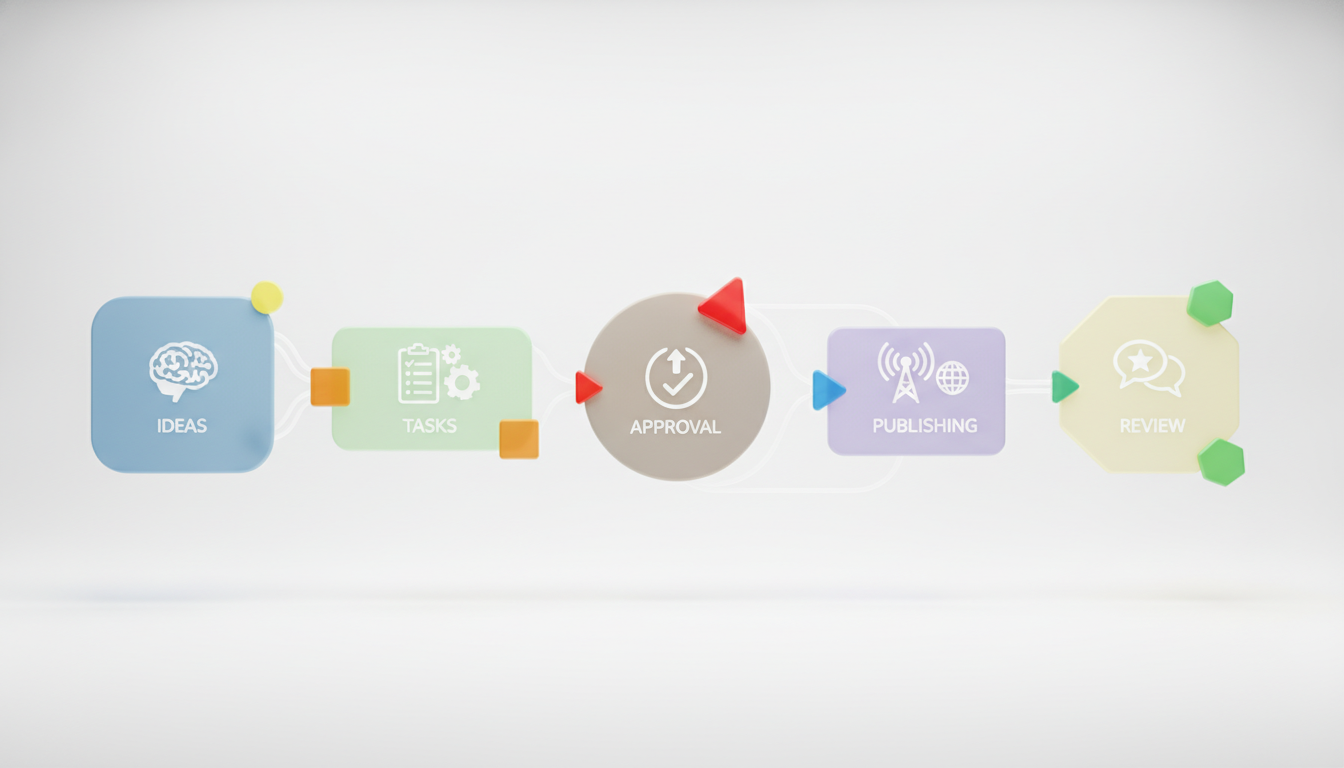
For most teams, the best content workflow is:
- Planned: topic approved, goal defined, owner assigned
- Brief in progress: outline, target keyword, audience, and references prepared
- Drafting: writing and asset creation underway
- Review/approval: editorial, brand, legal, or stakeholder review
- Scheduled/published: final asset queued, published, and ready for reporting
That model balances strategy and execution without adding complexity. It also maps cleanly to how modern content planning software works: one place for ideas, one place for tasks, one approval checkpoint, one publishing handoff, then performance review. Add subtasks where needed, but keep the top-level statuses stable.
What to avoid when configuring the tool
The biggest setup mistake is making the tool mirror every organizational nuance. That creates a content approval workflow nobody enjoys using. Instead:
- Use one owner per asset, even if several people contribute
- Limit required custom fields to what people truly use
- Separate asset type from workflow stage so reports stay clean
- Use tags or campaign labels for strategy themes and content pillars
- Keep approvals explicit rather than buried in comments
- Set a review-stage time limit, so nothing sits in “waiting on legal” for three weeks without escalation
Shared calendars, reminders, and notifications are valuable here, but only if the statuses behind them are clear. A reminder on a vague task just creates more noise.
Best content planning tools by scenario
Now the tool-by-tool recommendations can be more specific. These are editorial judgments based on fit, not unsupported rankings.
Asana: best for structured editorial operations
Asana is a strong choice when your problem is not ideation but coordination. It works best for marketing teams that need dependable task assignment, approvals, timelines, and cross-functional visibility. If you have writers, editors, designers, and approvers working in parallel, Asana gives that work a clear operating structure.
The tradeoff is friction for smaller teams. If your publishing volume is modest, Asana can feel like too much system for too little content. Note too that the features most editorial teams actually want, including timeline view, forms, custom fields, and rules, all sit behind the paid tier — and approvals and proofing specifically require Advanced.
Monday.com: best for cross-channel planning with executive visibility
Monday.com suits teams that want a visual content planning system spanning blog, campaigns, email, creative, and social. Its strength is flexibility: boards, dashboards, status columns, and automations make it easier to connect strategy to execution.
The tradeoff is setup discipline. Monday.com can become cluttered if every team builds boards differently. It is best when one person owns the schema and keeps the workflow consistent. Watch the automation allowance as well, since a few busy boards can consume a monthly limit faster than expected.
Notion: best for small teams that think in documents first
Notion is ideal when content planning, briefing, drafting, and knowledge management belong together. It is particularly good for editorial teams that want an editorial calendar plus rich briefs and process documentation in one place.
The limitation is operational control. Notion can support a workflow, but it is not naturally as rigid about approvals, permissions, and reporting as tools built around task execution. Teams that need an audit trail of who approved what usually outgrow it.
Trello: best for simple content workflows
Trello is the easiest recommendation for lean teams that need clarity fast. If your team needs a board with ideas, drafting, review, and published columns, Trello can be enough. It is also approachable for contributors who do not want to learn a full project platform.
The tradeoff is scale. Once the team needs advanced reporting, multi-step approvals, or complex campaign structures, Trello starts to show its limits. The free plan also holds back calendar and timeline views, which is often the first thing an editorial team wants.
ClickUp: best for teams that want one platform for nearly everything
ClickUp works best for teams that want docs, tasks, dashboards, automations, and multiple planning views in one platform. It can support a full content marketing workflow and offers the flexibility to move from content calendar planning into broader operations. Its free tier is the most generous on this list, with no seat cap, which makes it easy to trial with the whole team.
The limitation is that flexibility itself. ClickUp rewards process-minded teams; it can overwhelm teams that just want a clean editorial operating system, and its learning curve is the most common reason teams leave it.
Airtable: best for content operations and campaign structure
Airtable is a strong fit when content is part of a larger campaign machine and organization matters as much as scheduling. If your team relies on tagging, linked content types, channel-specific fields, and campaign-level visibility, Airtable is often the most powerful option on this list.
The tradeoff is usability. Airtable makes sense to operations-heavy teams, but some writers and stakeholders find it less intuitive than more document- or board-oriented tools. Its free record limit also arrives sooner than most teams plan for.
CoSchedule: best for calendar-led marketing teams
CoSchedule is a good fit when your central challenge is keeping an editorial calendar and promotion schedule on track. It works especially well for teams that care about publishing cadence, campaign timing, and coordinated social promotion.
The tradeoff is breadth. If you need highly custom approval paths or deep content database logic, other tools may fit better.
HubSpot Content Hub: best if you already run on HubSpot
HubSpot Content Hub makes sense when your CRM, email, landing pages, and campaign reporting already live in HubSpot. The advantage is not the planning features themselves, which are less flexible than Monday’s or ClickUp’s, but the fact that a published piece connects to contact records and attribution without any integration work. For teams whose hardest question is “which content actually generated pipeline,” that connection is worth more than a better calendar view.
The tradeoff is cost and lock-in. Priced against the tools above it is expensive, and the planning layer is difficult to justify if you are not already committed to the wider HubSpot ecosystem.
Integrations and publishing: the checks buyers skip
Feature comparisons tend to stop at the calendar view, but the handoffs on either side of it cause most of the day-to-day friction. Before you commit, check four things.
- CMS handoff. Does anything connect the tool to where content actually goes live, or will someone copy, paste, and reformat every post? For WordPress-based teams this is often the single biggest hidden time cost.
- Where drafts live. If writing happens in Google Docs and planning happens elsewhere, make sure the link between task and draft is one click, not a search.
- Performance data. Can the tool pull in, or at least link to, Search Console and analytics so the calendar and the results sit near each other?
- Guest and client access. Freelancers, agencies, and reviewers often need view or comment access. Check how each plan counts them, because some bill guests as seats and some do not.
What about AI features in 2026?
AI has become a real differentiator this year, not just a marketing badge, so it is worth weighing where each tool puts it. The useful distinction is between AI that helps you write and summarize and AI that helps you run the workflow.
- Notion leans into content and knowledge work: AI for drafting, summarizing, and Q&A across your workspace, plus agents that can run scheduled tasks. Best if writing and documentation sit inside the tool. Note that full AI now requires the Business tier.
- ClickUp offers ClickUp Brain for summaries, task generation, and workflow assistance, though it is usually a paid add-on on top of your plan.
- Monday.com and Asana focus AI on the operations side, drafting updates, suggesting assignments, and surfacing risks or bottlenecks, typically metered by credits.
- Airtable has moved toward an AI-native model, with AI fields, automations, and agents that can research and act on records (paid plans).
One practical warning: AI in these platforms is increasingly sold as credits rather than a flat feature, so a workflow that runs an AI step on every task can cost more than the seats do. Check the allowance before you build automations that depend on it.
The honest guidance: do not choose a planning tool for its AI alone. Pick the tool that fits your workflow first, then treat AI as an accelerator on top. A tool that models your process well without AI will beat a weaker tool with a flashy assistant bolted on.
Planning for AI search, not just Google rankings
The bigger 2026 shift is on the demand side rather than inside the tool. Buyers increasingly get an answer before they get a list of links. Conductor’s analysis of roughly 22 million queries found AI Overviews appearing in about a quarter of Google searches, up from around 13% a year earlier, and 6sense’s buyer research reported that the large majority of B2B buyers now use generative AI somewhere in their purchase process.
Keep this in proportion. Direct referral traffic from AI assistants is still a low single-digit share of visits for most sites, so this is not a reason to abandon search fundamentals. What it does change is what “published successfully” means. A post can rank well and still be absent from the answer an AI assistant gives about your category, and none of the tools above will tell you that.
Practically, that means adding two things to whatever planning system you choose. First, structure content so it can be quoted: a direct answer in the opening lines, clear headings that match real questions, defined terms, and specific figures with sources. Second, track citations and mentions alongside rankings, so you can see whether AI assistants are referencing you at all. Some teams do this with manual prompt checks each month; tools built for generative engine optimization automate the tracking and feed it back into the next planning cycle.
How to run a two-week trial before you commit
Demos flatter every tool. A short structured trial does not. Run one real campaign, not a sandbox, and watch for these signals.
- Days 1–2: build only the five stages above and three custom fields. If you need more than that to start, the tool is probably too complex for your team.
- Days 3–7: move two real pieces through the full workflow, including a genuine approval from whoever normally slows things down.
- Days 8–12: add one person who is not in marketing. If they need training to leave a comment or approve something, adoption will be a problem.
- Days 13–14: try to answer three questions from the tool alone: what ships this week, what is stuck, and who owns it. If you have to ask someone in Slack, the setup is not working yet.
Whichever tool wins that test is almost always the right one, regardless of which has the longer feature list.
How do you tell whether the tool is actually improving productivity and performance?
Judge it on three measurable layers rather than on whether people enjoy using it: workflow efficiency, team visibility, and content outcomes. A 60-day before-and-after comparison is usually enough to see the answer clearly.
Teams often judge content planning software by whether people like using it. That matters, but it is not enough. The better test is whether the tool improves speed, consistency, and decision-making.
Measure three layers. First, workflow efficiency: on-time publishing rate, average time from brief to publish, and number of assets stuck in review. Second, team visibility: fewer status-check meetings, fewer duplicate tasks, and clearer ownership. Third, content outcomes: whether tagged topics, formats, or campaigns reveal patterns in performance over time.
Performance tracking matters because it turns a content calendar into a learning system. The useful question is not “Did we publish?” but “Which content pillars, formats, and campaigns kept earning distribution, engagement, or downstream value?” If your tool cannot help you connect planned work to that review, it is only solving half the job.
A practical 60-day check works well. Compare the two months before and after rollout on missed deadlines, approval delays, publishing consistency, and time spent hunting for briefs or status updates. If those numbers do not improve, the issue is either poor setup or the wrong tool category.
It is worth naming what the tool cannot be blamed for. In CMI’s 2026 research, among marketers whose content strategy improved, 74% credited refining the strategy itself while 51% credited new technology. Software amplifies a plan. It does not supply one.
If you are moving from spreadsheets, choose your tool by migration risk
Most spreadsheet teams underestimate transition friction. The safer path is to audit existing content, define a calendar structure, import only active priorities, and run both systems in parallel for a short period.
If your spreadsheet is mainly a publishing tracker, move to Trello, Notion, or CoSchedule first. If it is already acting like a rough operations database with owners, channels, campaigns, and dependencies, skip lightweight tools and move directly to Airtable, Monday.com, Asana, or ClickUp.
One rule saves a lot of pain: do not migrate archived content. Bring across what is live, in progress, or planned for the next quarter, and leave the historical rows in the spreadsheet as a reference. Teams that try to import three years of history usually stall in week two.

Which content planning tool fits your situation?
If you want the clearest decision trigger, use this: choose based on the bottleneck you need to remove next, not the broadest feature set.
Pick Notion if your team is small and needs strategy, briefs, drafts, and calendar planning in one workspace. Pick Trello if ease of adoption matters most and your workflow is straightforward. Pick Asana if your main problem is task ownership and approvals. Pick Monday.com if multiple teams need one visual operating layer across channels. Pick ClickUp if you want one highly configurable platform and are willing to manage complexity. Pick Airtable if your content operation behaves like a structured campaign database. Pick CoSchedule if your center of gravity is an editorial calendar plus promotional scheduling. Pick HubSpot Content Hub if you already run on HubSpot and want content tied to attribution.
If your operation is lighter than this guide assumes — one editor, no formal approvals, a handful of pieces a month — you may not need a platform at all. Our roundup of editorial planning tools covers that end of the market.
The mistake to avoid in 2026 is buying content planning tools for aspiration instead of reality. A five-person team does not need enterprise-grade complexity to look sophisticated. It needs a system people will actually use, one that makes strategy visible, publishing more consistent, and approvals less chaotic.
FAQ
What is the best content planning tool in 2026? There is no single best tool, because the answer depends on team size and bottleneck. Notion and Trello suit teams of one to five. Asana, Monday.com, and ClickUp suit teams of five to fifteen with recurring approvals. Airtable and Monday.com suit high-volume, multi-channel operations. CoSchedule suits calendar-led marketing teams, and HubSpot Content Hub suits teams already running on HubSpot.
What is the best rated content calendar in the industry? Monday.com and ClickUp, both around 4.7 stars on G2, with Asana close behind at about 4.4 from more than 13,000 reviews. Among calendar-first tools rather than general project platforms, CoSchedule rates highest. Ratings shift, and these tools are reviewed as project management software rather than editorial calendars, so treat the ranking as directional.
Which content planning software is highest rated for editorial calendar management and workflow automation? On G2, Monday.com and ClickUp carry the highest scores in this group at roughly 4.7 stars, with Asana at about 4.4 from more than 13,000 reviews. Treat those as directional: the tools are rated as project management software rather than editorial calendars, review volumes differ enormously, and most reviews reflect the first few months of use rather than year two.
What is the best content calendar software? Notion or Trello for small teams, CoSchedule when publishing cadence is the main concern, and Monday.com or ClickUp once the calendar has to carry approvals and reporting too. A calendar is only the visible layer; what separates these tools is the workflow underneath it.
Which tools are best for team commenting and approvals? ClickUp gives the most approval capability per dollar, Asana has the cleanest formal approval model but only on its Advanced tier, and Notion has the best commenting with no approval state at all. Our dedicated comparison covers all nine tools on commenting and approvals alone.
What are the best tools for creating and managing a national day calendar? Notion and Airtable are the best long-term options, because you can build a reusable database of observances tagged by relevance, audience, and lead time. CoSchedule ships calendar templates that already include awareness days if you want something usable immediately. The real work is curation — most awareness-day lists run to hundreds of entries and only a handful will be relevant to your audience.
What is the difference between a content planning tool and a content calendar? A content calendar shows what publishes and when. A content planning tool adds the work around it: ideas, briefs, owners, statuses, approvals, and reporting. Every planning tool contains a calendar, but a calendar on its own does not manage the workflow behind it.
Which content planning tool has the best free plan? ClickUp’s free plan is the most generous, with unlimited members and tasks, which makes it the easiest to start a growing team on without a seat cap. Notion is generous for solo users, Trello covers up to 10 collaborators, while Asana and Monday now cap their free tiers at two seats.
What is the cheapest content planning tool for a small team? On paid plans, Trello (~$5/user/mo) and ClickUp (~$7/user/mo) tend to be the lowest entry points, but “cheapest” depends on where a tool forces an upgrade. Factor in the free-plan limits, seat minimums, and the first paid tier you would actually need. Monday’s three-seat minimum, for example, means a two-person team still pays for three.
What is the best way to manage content deadlines and assignments? One owner per asset, five workflow stages, and a hard time limit on the review stage. Most missed-deadline problems are process problems the software is faithfully reproducing, so fix the stages before changing tools.
Do I need a tool with built-in AI? Not necessarily. AI is a helpful accelerator for drafting, summarizing, and surfacing bottlenecks, but it should not drive the choice. Pick the tool that models your workflow best, then use its AI on top. Check whether AI is metered by credits, since heavy automation can cost more than the seats.
Can a general project management tool work as a content planning tool? Yes, when configured correctly. Asana, ClickUp, Trello, and Monday.com all work well for content when set up with clear stages, ownership, calendar views, and approval steps. The configuration matters more than the tool category.
Do content planning tools help with SEO or AI search visibility? Not directly. They coordinate work; they do not analyze search demand, identify content gaps, or track whether AI assistants cite you. Most teams pair a planning tool with a separate SEO or GEO platform, or with a manual quarterly research process, to decide what belongs on the calendar in the first place.
What is the best CMS with a built-in editorial calendar and planning tools? Most content teams do not get their editorial calendar from their CMS. WordPress offers calendar and planning through plugins rather than natively, and headless platforms generally leave planning to a separate tool. HubSpot Content Hub is the main exception, since planning, publishing, and reporting sit in one system. The common pattern elsewhere is a dedicated planning tool sitting alongside the CMS, with content published into the CMS at the end of the workflow.
How long does it take to switch tools? Budget a short parallel-run period rather than a hard cutover. Simple trackers can move in days; operations-heavy setups on Airtable or Asana often take one to two weeks of cleanup and testing before you fully rely on them. Migrating only active and planned content, rather than your full archive, is the single biggest time saver.

Related Posts