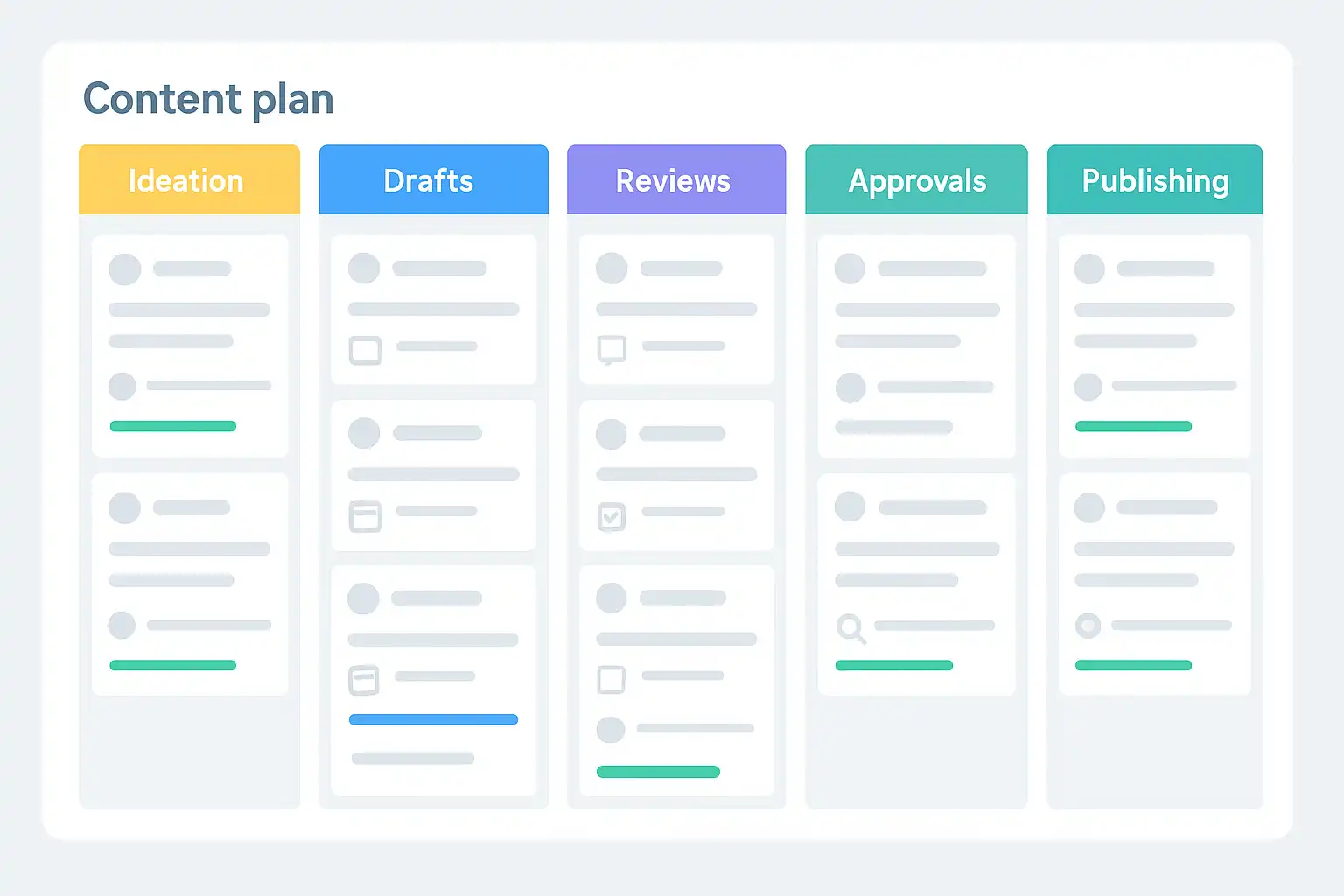
If you are looking for a content plan template with workflow stages, you probably want to make your content process smoother, more organized, and less stressful. The goal is simple: you need a clear, repeatable method for planning, creating, and getting approval for every piece of content, whether it’s a blog post, social media update, email, or video. In today’s fast-moving teams, having a template that defines every workflow stage and integrates approvals is essential for delivering high-quality content on time, every time.
What is a content plan template with workflow stages?
A content plan template with workflow stages is a structured, repeatable outline that guides your content from the idea stage to publication and beyond. It doesn’t just track topics and deadlines; it maps out every step of the process—ideation, drafting, revisions, approvals, and publishing. Even better, it assigns roles and deadlines at each stage. This way, everyone knows what to do, when to do it, and who approves what.
Using a template with set workflow stages isn’t just about getting organized. It helps teams avoid bottlenecks, lost files, forgotten tasks, and confusion about who’s responsible for each step. In particular, when content must pass through multiple reviewers or departments, a clear approval process built right into your planning template keeps everything on track and transparent.
Why do teams need workflow stages in content planning?
Content creation is rarely linear. It often involves brainstorming, research, writing, editing, approval, and distribution—sometimes looping back to earlier steps when revisions are needed. Without defined workflow stages, important details get missed, and content may get delayed or published without the necessary checks.
When you use workflow stages in your content plan, you ensure every piece follows the same high standards. Each step is documented, and stakeholders can track progress in real time. This is especially valuable for remote or cross-functional teams where communication gaps are common. Adding automated notifications, feedback loops, and collaborative tools further enhances efficiency and transparency.
What are the essential components of a content plan template with workflow stages?
A robust content plan template with workflow stages should include several key components:
- Content ideas and topics: A space to collect, prioritize, and plan upcoming ideas.
- Content types: Identify the format (blog, video, infographic, social post, etc.).
- Workflow stages: Clearly defined steps such as ideation, drafting, internal review, subject-matter review, approval, QA, and scheduling.
- Assigned roles: Designate team members for each stage (writer, editor, reviewer, approver, publisher).
- Deadlines and timelines: Record start dates, due dates, and buffers for each task.
- Status tracking: Visual trackers (like “In Progress,” “Needs Review,” “Approved”) to monitor progress at a glance.
- Feedback and comments: Centralized feedback areas to keep communication clear and visible.
- Approval indicators: Spaces or checkboxes showing who approved what, and when.
- Attachments and references: Links to drafts, briefs, images, or resources.
- Automated reminders: Optional integrations that nudge team members about deadlines or actions needed.
When you combine these elements, your team gains a comprehensive tool to plan, produce, review, and publish content without missing a beat.
How does a template improve approvals and team collaboration?
Approvals can be one of the most time-consuming bottlenecks in content production. When every stakeholder knows when they’re needed, what’s expected, and how to give feedback, approvals flow faster. A good content plan template breaks down the process into clear stages, each with its own sign-off or action.
For example, the template might show that after the draft stage, the editor reviews and adds comments, before sending the piece to the legal team for compliance checks. Each person gets notified only when it’s their turn—reducing emails and confusion. Automated reminders keep everyone on schedule, while clear records ensure accountability.
Moreover, a shared template fosters collaboration. Team members can work together in real-time, view comments or changes, and see what’s coming up next. This transparency reduces miscommunication and ensures that even if someone is out, others can step in without delays.
What workflow stages should be included for maximum efficiency?
While every team’s process is unique, most efficient content plan templates include the following workflow stages:
- Ideation and Planning: Gather and discuss new content ideas, then choose which to pursue.
- Brief Creation: Prepare a detailed brief including the topic, audience, and goals.
- Content Creation: Draft the content according to the brief.
- Internal Review: Editing by internal writers or editors to ensure quality and consistency.
- Subject-Matter Review: Experts check for accuracy, technical details, or compliance (if needed).
- Approval: Designated stakeholders review and approve the final version.
- Quality Assurance (QA): Final checks for grammar, formatting, links, and visuals.
- Scheduling/Publishing: Prepare the content for release on the appropriate channels.
Some content types, like social posts or press releases, may need extra steps, such as legal review or translation. The key is customizing your template to fit your exact needs while keeping the process easy to follow.
What tools help automate and manage content workflow stages?
There’s a wide variety of platforms and tools designed to streamline content workflows. Tools like Trello, Asana, Airtable, Monday.com, and ClickUp offer visual boards, automation, and easy collaboration. For content-focused needs, solutions such as CoSchedule, ContentCal, and Planable provide built-in content calendars and approval workflows.
Specialized software also integrates with Google Workspace, Microsoft Teams, or Slack so teams can keep using familiar communication channels. Using these tools, you can automate reminders, assign tasks, collect feedback, and easily locate resources or past versions. For inspiration on what’s possible, consider exploring overviews such as Top Content Approval Tools to identify a system that fits your team’s workflow.

How to create a content plan template with workflow stages: step by step
Getting started with a workflow-driven template is easier than you might think. Here’s a step-by-step guide:
- Map your process: List all steps from idea to publication, including every person involved.
- Define your workflow stages: Break the process into clear actions like “draft,” “review,” “approval,” etc.
- Assign owners: For each stage, specify who is responsible (be as specific as possible).
- Set deadlines: Give each stage realistic timelines, adding buffers for review and revisions.
- Design your template: Create a spreadsheet, form, or project board to track tasks and stages.
- Centralize feedback: Make sure everyone knows where to leave comments and suggestions.
- Track progress: Use status columns (“In Progress,” “Needs Approval,” etc.) and automated alerts where possible.
- Customize for your team: Add or remove stages based on content type or team needs.
- Test and revise: Run a pilot, collect feedback, and adjust your template for better results.
Once refined, your new workflow will reduce confusion and make it easier for everyone to focus on creative work instead of chasing tasks.
What are the main benefits of using a content plan template with workflow stages?
Teams that use workflow-driven templates quickly see improvements in speed, quality, and morale. Here are some of the biggest benefits:
- Clarity: Everyone knows their tasks, deadlines, and who approves what.
- Accountability: Assigned roles and documented approvals reduce finger-pointing and confusion.
- Efficiency: Automated reminders and clear processes move content faster through the pipeline.
- Visibility: Managers and stakeholders can see what’s in progress, what’s delayed, and how to help.
- Consistency: Every piece of content passes through the same quality and review checks.
- Scalability: As your team or content needs grow, the template is easy to adapt and expand.
Which brands and teams use these templates?
Major newsrooms, marketing agencies, and in-house content teams all rely on workflow-driven content planning. For example, agencies use detailed templates to manage client approvals on campaigns, avoiding last-minute surprises. In-house teams at large organizations may require multiple rounds of stakeholder review before publishing, making workflow clarity essential.
Even small businesses can benefit from using a workflow-based approach. If you need a starting point that covers multichannel needs, you can find a practical content plan template that provides flexibility for blogs, email, social, and more.
How can you customize a content plan template for your team?
No two teams are exactly alike, so it’s important to tailor your template. Here’s how:
- Add or remove workflow stages to match your process—for example, skip the legal review if not needed, or add a translation stage.
- Choose tools that fit your workflow: some teams love drag-and-drop boards, others prefer spreadsheets or calendars.
- Use color coding or tags to identify high-priority projects or urgent deadlines.
- Include space for campaign goals, SEO keywords, or promotional plans.
- Make sure feedback is easy to track—use comment fields or built-in chat functions.
- Automate as much as possible, such as reminders or status updates.
Regularly review your template. Ask your team what works and what doesn’t, and update often. This keeps everyone engaged and improves your process over time. For enterprises or growing teams, frameworks such as a Content governance template can be helpful for establishing uniform standards across departments.
How does a content plan template support cross-team alignment?
When marketing, product, legal, and design all work together, confusion can arise if everyone uses different systems. A unified content plan template with workflow stages creates a single source of truth for all teams involved. This brings everyone onto the same page—even when schedules, priorities, or feedback methods vary.
Cross-team alignment is especially important during campaigns or product launches when timing matters. With a shared template, you avoid double work, keep messaging consistent, and ensure that nothing important gets missed because of miscommunication.
Consider how this approach fits with best practices outlined in resources like Content Approval Template when shaping your own strategy.

What are some real-world examples of workflow stages?
Let’s look at sample workflows for different types of content:
| Content Type | Sample Workflow Stages |
|---|---|
| Blog Post | Idea → Brief → Draft → Edit → SEO Review → Approval → Publish |
| Social Media | Idea → Design → Review → Schedule → Publish |
| Email Campaign | Strategy → Copywriting → Design → Review → Approval → Send |
| Video | Script → Filming → Edit → Review → Approval → Publish |
These examples highlight how workflow stages can be tailored for each channel or content type. The right template makes it easy to repeat successful processes and adapt quickly to new formats.
What makes a content plan template truly effective?
The best templates balance structure and flexibility. If you make your workflow too rigid, it becomes a chore; too loose, and things fall through the cracks. Some features of effective templates include:
- Simple, intuitive layout so anyone can use it—regardless of their experience.
- Options to filter or sort by status, owner, or deadline.
- Space for collaborative feedback and discussion that’s visible to the whole team.
- Customizable fields for unique needs (such as campaign tracking or localization).
- Integration with other tools for seamless handoffs and less manual entry.
Most importantly, effective templates foster a sense of ownership. When everyone is clear on expectations, accountability, and next steps, teams operate with confidence and less stress.
How to present your content plan template to stakeholders?
Getting leadership support can help teams stick to new workflows. Present your template as a solution to existing bottlenecks, missed deadlines, or quality concerns. Emphasize benefits such as transparency, improved efficiency, and the ability to scale content production.
Show how the template integrates with existing tools or processes. Offer examples of successful projects using workflow-driven planning. Collect feedback and be willing to adjust; this demonstrates the template is built for real-world use, not just theory.
Common questions about content plan templates with workflow stages
What’s the best way to set up approval steps in a template?
The most effective method is to create a separate column or field for each approval required, such as “Marketing Approval” or “Legal Approval.” Assign responsible persons and ensure the template records the date and status of each sign-off. Automated notifications can remind stakeholders when it’s their turn, reducing delays and missed steps.
How often should a team update its workflow?
Regular reviews—at least quarterly—are essential. After major launches or campaigns, gather the team, discuss what worked, and adjust the workflow stages as needed. Continuous improvement is key for keeping your template useful and relevant.
Can these templates handle multichannel campaigns?
Absolutely. Modern templates are designed to accommodate multiple channels—blog, email, social, and more. You can add channel-specific columns or tags, making it easy to track campaign assets and deadlines across all platforms from a single dashboard.
What if our team has complex compliance or legal needs?
When compliance is critical, add dedicated workflow stages for legal or regulatory review. Assign responsible parties and set non-negotiable deadlines. Look for software that archives approval records for auditing. Building these steps into your template reduces risk and keeps your content above board.

Related Posts