
If you need an ai content strategy template you can actually use this week, start with one principle: strategy comes before prompts. Teams that skip goals, governance, and distribution usually get a pile of drafts instead of a repeatable content system. That problem is visible on the audience side too. In Gartner’s latest consumer survey, 49% of U.S. consumers said GenAI has made content quality worse, which is exactly why a practical workflow matters: AI needs structure, review rules, and clear standards.
This guide gives you a working framework, not a theory lesson. You will get a fill-in template, decision rules for when to use AI and when not to, and examples for a small business blog, a B2B SaaS team, and an ecommerce brand. By the end, you should be able to build your own AI-assisted content plan, assign roles, and publish with less waste.
What an AI content strategy template should actually do
A useful template is not a content calendar with “use ChatGPT” added to it. It is a decision document that connects business goals, content operations, and AI usage rules. If the template does not help your team decide what to create, how to create it, and how to review it, it is too shallow.
A strong ai content strategy template should answer five operational questions:
- What business outcome is this content supposed to influence?
- Which audience segment is it for?
- Where will AI help, and where is human expertise required?
- How will quality, accuracy, and brand fit be checked?
- How will the team measure whether the content worked?
That last point matters more than many teams admit. If your template stops at ideation, it will generate activity without accountability. Strategy needs a loop from planning to performance back into planning again.
The practical framework: 8 fields to complete before you generate a single draft
The fastest way to make AI useful is to force clarity early. Fill these eight fields before anyone opens a writing tool. That prevents the common failure mode where the model invents a plausible article around a vague brief.
1. Business goal
Write one primary outcome. Examples: increase demo requests, improve branded search visibility, support product education, reduce support tickets, or grow non-brand organic traffic.
2. Audience and job-to-be-done
Name the reader and the action they are trying to complete. “Marketing manager comparing AI workflows” is better than “marketers.” The content should solve a task, not target a demographic label.
3. Content use case
Define the content type and channel. Examples: blog post, landing page, help article, email nurture, comparison page, LinkedIn post, or video script. AI output quality changes depending on format, so this field prevents generic drafts.
4. Search and discovery intent
Specify how the audience will find the content. Search intent may be informational, commercial, navigational, or post-purchase support. AI search engines also reward directness, so include the exact question the page should answer.
5. AI role in the workflow
Decide what AI is allowed to do. Typical options include topic clustering, outline generation, SERP pattern analysis, first-draft expansion, metadata creation, repurposing, and summarization. Do not default to “full article writing.” For expert content, AI usually works best as a drafting and structuring assistant, not the final authority.
6. Human review checkpoints
List the stages where a person must intervene. At minimum, define review for factual accuracy, brand voice, original insight, and legal or compliance sensitivity if relevant. This is also where you answer a practical question many teams forget: who has final approval? If nobody owns approval, content stalls or ships half-checked.
7. Quality standards
Set visible pass/fail criteria. Examples: includes one unique insight from internal expertise, avoids unsupported claims, uses current product terminology, answers the primary query in the first 150 words, and ends with a clear next step.
8. Success metrics
Choose one primary and two secondary metrics. A blog post might use qualified organic visits as primary, with engaged time and assisted conversions as secondary. A support article might use ticket deflection as primary.
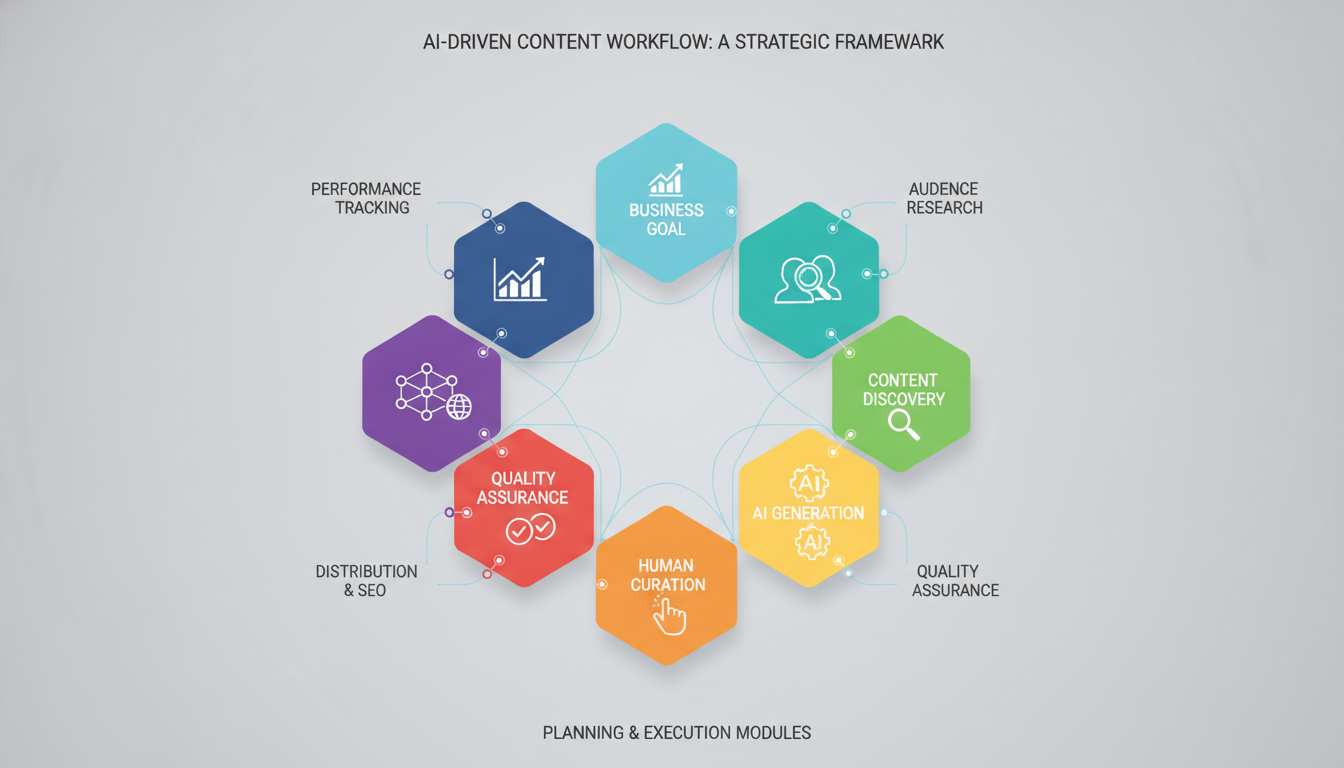
The fill-in ai content strategy template
Use this version as your operating document. Keep it simple enough that a strategist, writer, editor, or founder can complete it in one sitting. If it takes an hour to understand the template, people will ignore it.
| Template field | What to write | Example entry |
|---|---|---|
| Primary goal | Single business outcome this content supports | Increase product demo requests from organic search |
| Audience | Specific reader and their immediate problem | RevOps manager who needs a reliable AI documentation workflow |
| Core topic | Main subject and angle | AI content governance for growing B2B teams |
| Intent | Why the reader is searching now | Informational with a strong implementation focus |
| Format + channel | Content type and distribution location | SEO blog post published on resource center |
| AI tasks | What AI may do in production | Outline, draft sections, suggest title variants, repurpose into email |
| Human-only tasks | What AI may not decide alone | Expert claims, examples, positioning, compliance review, final edit |
| Quality gates | Pass/fail review standards | No invented facts; clear CTA; terminology checked against product docs |
| Primary metric | Main indicator of success | Demo requests assisted by organic blog visits |
How to build your template in the right order
Order matters. If you start with tools or prompts, you will optimize production before you know what deserves to be produced. The sequence below keeps strategy in front of automation.
- Choose one business objective. If a page is trying to educate, rank, convert, and reduce churn equally, it will usually do none of them well.
- Define the audience task. Write the exact problem the reader wants solved in one sentence.
- Map one content type to one stage. A how-to article for first-touch discovery should not be evaluated like a bottom-of-funnel comparison page.
- Assign AI to narrow tasks. Start with outlining, summarizing source material, and content repurposing before trusting AI with final messaging.
- Set hard review checkpoints. This is where you decide how facts are checked, who edits for voice, and what gets escalated.
- Document the metric before publishing. If the metric is chosen afterward, teams tend to justify weak content with vanity numbers.
This sequence also answers a common implementation problem: can a small team use the same template as a larger one? Yes, but the number of people involved changes, not the logic. A solo operator might combine strategist, writer, and editor into one role; an enterprise team may split them across specialists. The template still needs the same fields.
When AI should help and when it should stay out of the way
Most content teams do not fail because they use AI. They fail because they use AI for the wrong parts of the workflow. The rule is simple: use AI where pattern recognition and transformation help, and keep humans in charge where judgment, accountability, and originality matter.
High-value uses for AI
- Turning a rough idea into 3 to 5 outline options
- Extracting recurring subtopics from existing notes or transcripts
- Reformatting one long asset into social posts, email copy, or summaries
- Suggesting title options, meta descriptions, and intro variants
- Organizing internal source material before a writer drafts
Tasks that should remain human-led
- Making factual claims without verified source material
- Expressing brand position on a contested topic
- Creating original examples tied to customer experience
- Writing compliance-sensitive copy
- Approving final publication
If your team struggles with off-brand output, the fix is usually not “better prompting” alone. The better fix is narrowing AI’s responsibility, then giving it stronger inputs: approved messaging, product language, audience context, and examples of what good looks like.

Three worked examples you can adapt
The framework becomes useful when you can see it in context. These examples show how the same ai content strategy template changes by business model, audience urgency, and editorial risk.
Example 1: B2B SaaS educational blog
Goal: Attract qualified traffic for product education.
Audience: Operations leaders evaluating process automation.
AI role: Build outline from internal call notes, draft non-technical sections, generate CTA variants.
Human role: Add product nuance, verify terminology, insert practical examples from implementation experience.
Quality gate: Every section must answer a real workflow question, not just define terms.
Primary metric: Organic visits from target-topic pages that lead to product page sessions.
Example 2: Ecommerce buying-guide content
Goal: Help shoppers choose the right product category and reduce hesitation.
Audience: New buyers who know the problem but not the product differences.
AI role: Create comparison table drafts, summarize product attributes from approved catalog data, generate variant intros for different search intents.
Human role: Confirm claims, remove generic language, add merchandising judgment and brand tone.
Quality gate: No feature claims unless they match catalog or support documentation exactly.
Primary metric: Assisted product page clicks from the guide.
Example 3: Solo consultant content engine
Goal: Publish consistently without sounding automated.
Audience: Buyers comparing service approaches and wanting proof of expertise.
AI role: Turn voice notes into outlines, summarize meeting insights, repurpose blog posts into newsletters.
Human role: Supply the point of view, examples, client-safe lessons, and final polish.
Quality gate: Each article must include one observation that came from real work, not pattern-matched internet phrasing.
Primary metric: Inbound inquiries mentioning specific articles or topics.
A simple workflow your team can run every week
Templates only matter if they survive contact with the calendar. This weekly workflow keeps the strategy document tied to production. It is also the easiest way to prevent AI-assisted content from becoming a low-trust publishing treadmill.
- Monday: Choose one audience problem and complete the template fields.
- Tuesday: Use AI to generate outline options and supporting structure, then have a human choose one.
- Wednesday: Draft with AI assistance only where it speeds formatting, summarization, or expansion.
- Thursday: Review for factual accuracy, brand fit, clarity, and originality.
- Friday: Publish, distribute, and log the asset against the chosen metric.
If your team asks whether every article needs the same level of review, use a tiered rule. High-risk content such as product claims, legal topics, health topics, or executive thought leadership gets full review. Low-risk content like event recaps or lightly edited transcripts can move faster. That distinction belongs inside the template, not in someone’s memory.
The mistakes that break an AI content strategy
Most broken systems have the same pattern: they scale output before they define standards. Avoid these errors and your template will stay practical.
- Confusing volume with strategy. Publishing more often does not fix weak topic choices.
- Letting AI invent examples. If you do not provide examples, the model will often create generic or unreliable ones.
- Skipping source discipline. Even when facts sound plausible, they still need checking.
- Using one prompt for every channel. A LinkedIn post, a product page, and a support article require different structures.
- No ownership model. If nobody owns quality, quality declines fast.
Another mistake is treating voice as a final cosmetic edit. Voice starts earlier, in what the article chooses to emphasize, what tradeoffs it admits, and what examples it uses. If the strategy template does not capture brand perspective, the final draft will sound interchangeable.

Your first draft of the template can be deliberately small
You do not need a giant operating manual to start. For most teams, version one should fit on a single page and include only the fields that change decisions. The biggest win comes from making expectations explicit: what the content is for, what AI is allowed to do, and who is responsible for the final output.
If you are implementing this tomorrow, begin with one content stream, not your entire library. Pick a repeatable format such as educational blog posts or product explainers. Run the template for four weeks. Then look for friction points: weak briefs, unclear quality gates, or too much review time. Refine the process there rather than replacing the whole framework.
Make this ai content strategy template earn its place
A good ai content strategy template does not just organize content ideas. It reduces avoidable errors, protects quality, and makes production decisions easier under deadline. That is the difference between “we use AI for content” and “we have a system that publishes useful, trustworthy work.”
The best next step is not searching for more templates. It is opening a document, filling the eight fields for one real article, and testing the workflow against an actual publishing week. If your template helps a team choose better topics, use AI in narrower and smarter ways, and review with clear standards, it is doing its job.

Related Posts